![Nav Support Center.svg]](https://help.foodnotify.com/hubfs/Support%20Center/Design/Nav%20Support%20Center.svg)
When a delivery arrives, check it directly in the app – ideally right at the goods receipt. If something differs from the order, correct the unit, quantity or price. Tap Import order to book the goods into your stock.
Find orders
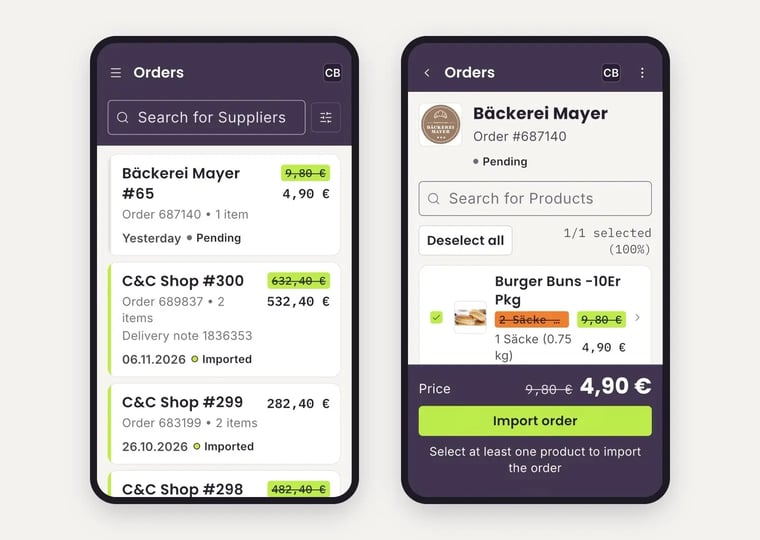
Open Orders in the menu. You see all orders of the selected location with supplier, order number, number of items, date, status and amount. Use the search to find a supplier and the filter icon to narrow down the list.
- The status shows whether an order is still Pending or has already been Imported.
- For imported orders, you also see the delivery note number if there is one.
- If an amount is crossed out, the order was changed. The new amount is shown next to it.
Check and import the delivery
- Tap the order. You see all ordered products. At the top, you see how many of them are selected.
- Only selected products are imported. If a product wasn’t delivered, remove it from the selection. Tap Deselect all to clear the whole selection.
- If a product differs, tap it. Under Edit product, choose the unit, set the delivered quantity with − and + and change the price with the pencil if needed.
- Tap Check product. In the list, you now see the original value crossed out and the new one next to it. The new total price is shown at the bottom.
- Tap Import order.
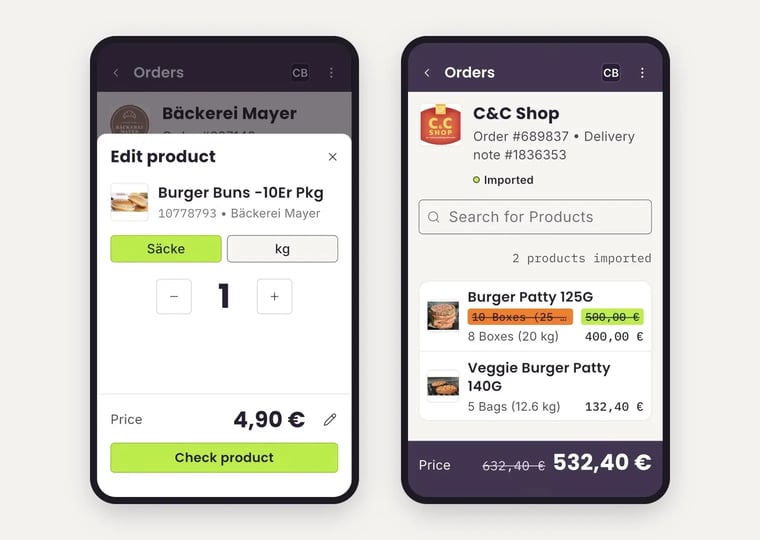
The order now has the status Imported, and the goods are booked into your stock. Import every delivery – otherwise your stock levels, stocktaking and reports won’t be right.
In the browser
You can also import orders in the browser in Inventory: How do I import an order into Inventory?
If your supplier sends digital delivery notes, here is what to look out for: Process digital delivery notes (DESADV) correctly