![Nav Support Center.svg]](https://help.foodnotify.com/hubfs/Support%20Center/Design/Nav%20Support%20Center.svg)
A digital delivery note (DESADV) comes directly from your supplier. You recognise it by the number that appears automatically in the Delivery notice column under Inventory › Orders. Changed quantities and prices are then already filled in.
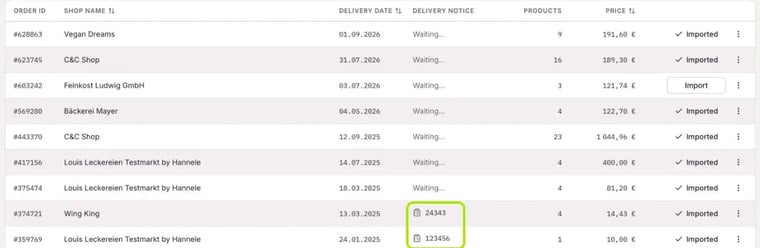
What to look out for
- All details come from your supplier. They can contain errors, for example swapped digits or a wrong quantity.
- Compare the details with the goods that actually arrived before you import the order.
- Your supplier can send the digital delivery note up to the delivery day.
Important: Only import a digital delivery note once the goods have arrived, never before.
In short
- Number in the Delivery notice column = digital delivery note
- Quantities and prices come directly from your supplier
- Always check before importing
- Only import when or after the goods arrive
More: How does the automatic delivery note matching work? and How do I import an order into Inventory?