![Nav Support Center.svg]](https://help.foodnotify.com/hubfs/Support%20Center/Design/Nav%20Support%20Center.svg)
Every food item you throw away has been paid for. When you record food waste, you see which products and which reasons cost you the most – and your stock level stays correct.
View food waste in the browser
In the sidebar, click Inventory › Food waste. At the top you see the Waste value – the value of the goods thrown away in the selected period – and the number of entries. Below, every entry is listed with product, reason, who reported it, date, quantity and price.
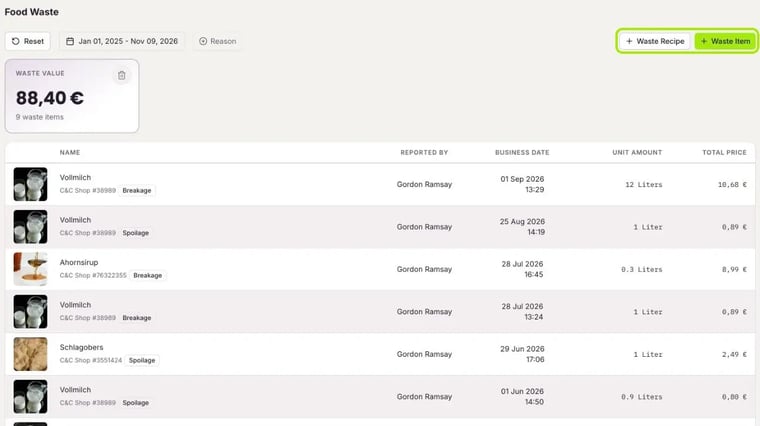
Use the filters at the top to choose the period and the Reason.
Waste an item
- Click Waste Item.
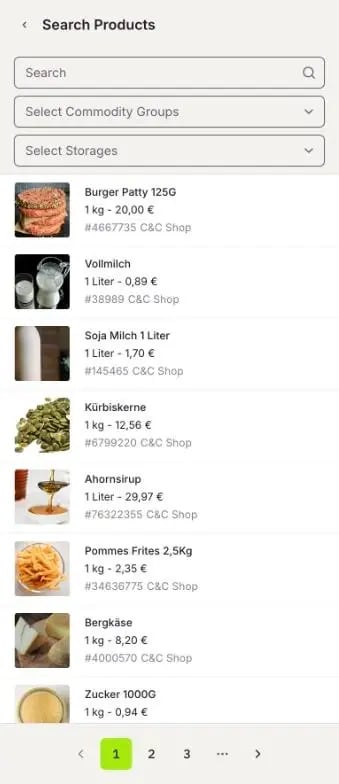
- Search for the product. You can also filter by commodity group or storage location.
- Click the product.
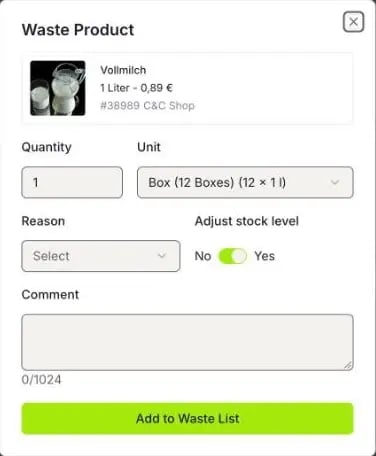
- Enter the Quantity and choose the Unit.
- Choose the Reason: raw waste, spoilage, breakage or over-portioning.
- Leave Adjust stock level on Yes so the quantity is deducted from your stock.
- Add a Comment if needed, for example “dropped while unloading”.
- Click Add to Waste List.
Waste a recipe
If a finished dish is left over, for example a tray of lasagne, click Waste Recipe and search for the recipe. Enter at least three letters.
Food waste in the app
In the FoodNotify app you record food waste right in the kitchen: search for the product, enter quantity, unit and reason, and add the entry. Entries from the app appear immediately in the browser under Inventory › Food waste. More: FoodNotify App for iOS and Android
Why can’t I find a product in the app? You can only record products that are already in your inventory. First import an order with this product: How do I import an order into Inventory?