![Nav Support Center.svg]](https://help.foodnotify.com/hubfs/Support%20Center/Design/Nav%20Support%20Center.svg)
Accurate numbers need complete data. The Completion dashboard shows you how far you are in your location – for Inventory, your recipes and your POS system. Open it in the sidebar under Completion dashboard. It shows the data of the location you selected at the top left.
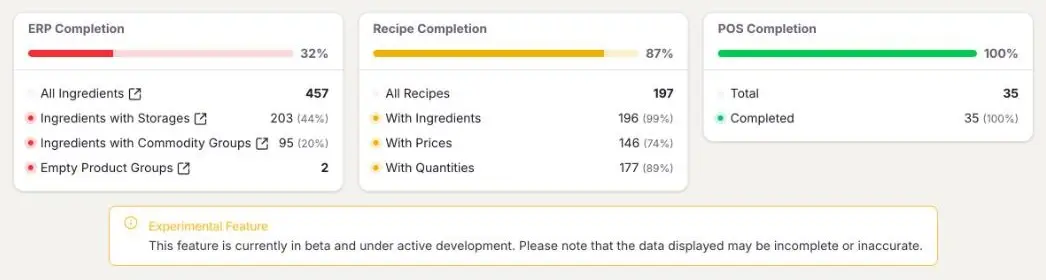
Each area has a bar showing the progress in percent. A red or yellow dot in front of a line shows where something is still missing; a green dot means done.
ERP Completion
- All Ingredients – all products in Inventory for this location.
- Ingredients with Storages – how many of them are assigned to a storage location.
- Ingredients with Commodity Groups – how many of them are assigned to a commodity group.
- Empty Product Groups – product groups without any products assigned.
If you click All Ingredients, Ingredients with Storages or Ingredients with Commodity Groups, the matching product list in Inventory opens in a new tab – for example all products without a commodity group. There you add the missing details.
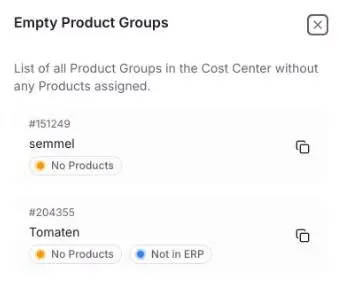
If you click Empty Product Groups, a list of these product groups opens on the right, with their number and notes such as No Products or Not in ERP.
Here is how to add missing storage locations and commodity groups: ERP Completion: Is my Inventory fully set up?
Recipe Completion
Shows how many of your recipes (All Recipes) already have ingredients (With Ingredients), prices (With Prices) and quantities (With Quantities). Only complete recipes give correct theoretical costs in Insights.
More: How do I create a recipe?
POS Completion
Shows how many of your POS items (Total) are already connected to a recipe (Completed). Connect open items here: How do I connect POS articles to my recipes?
Beta feature
The Completion dashboard is an experimental feature and is being actively developed. The data displayed may still be incomplete or inaccurate.