![Nav Support Center.svg]](https://help.foodnotify.com/hubfs/Support%20Center/Design/Nav%20Support%20Center.svg)
If your POS system is connected to FoodNotify, every sale deducts the ingredients of the linked recipe from stock. So how accurate your stock levels are depends on how well your recipes match your POS items.
Link a recipe and a POS item
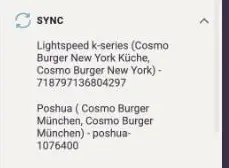
In a recipe's edit mode, you find the POS ID field for the item number of your POS system under Sales price. In the sidebar, Sync shows which POS systems the recipe is connected to. How the link works with your POS system: How do I connect POS articles to my recipes?
Example: cappuccino
The POS item Cappuccino is linked to a recipe: 8 g coffee beans and 50 ml whole milk. Whenever a cappuccino is rung up, FoodNotify deducts exactly these quantities.
If a guest orders the cappuccino with soy milk and the team also rings up the Soy milk key, two items are deducted: the cappuccino with whole milk and the soy milk. The stock level of the whole milk is then no longer correct.
Example: café au lait with a choice of milk
This is how you map variants cleanly:
- In your POS system, set a forced selection for the item Café au lait so that a type of milk always has to be chosen. How this works depends on your POS provider.
- In FoodNotify, create a recipe Café au lait with the coffee only, for example 8 g coffee beans.
- Create a separate recipe for each type of milk, for example 50 ml whole milk, 50 ml soy milk and 50 ml oat milk.
- Link all recipes to the matching POS items.
Now every sale deducts exactly the milk that was actually used. Also think about the prices, for example Café au lait €3.90 and Whole milk €0.00 – or Soy milk with a €0.50 surcharge.
Important: How detailed your recipes are is up to you. If you want every stock movement to be booked correctly, each variant needs its own recipe.
How to enter the sales price and POS ID in the recipe: How do I create a recipe?