![Nav Support Center.svg]](https://help.foodnotify.com/hubfs/Support%20Center/Design/Nav%20Support%20Center.svg)
Under Service integrations you connect FoodNotify with databases, suppliers, cash registers and other systems. Click the gear icon at the top right, then Service integrations. At the top you find six tabs: Databases, Retail assortment, Pos system, Invoice matching, Bi-Tools and Drittsysteme (third-party systems).
Databases
FoodNotify is connected to important food databases: general food data, organic and sustainable products, data especially for bakeries and confectioners, and brand products for Austria, Germany and Switzerland. Once a database is connected, you use its products directly in your recipes. This makes calculating nutritional values, allergens and additives much easier.
Your FoodNotify account manager will help you activate the databases.
Retail assortment
Here you connect to your suppliers. Usually you enter your customer number with the supplier. We forward it to the supplier for review, which can take up to 24 hours. After that you see the supplier's range in FoodNotify.
Pos system
Once your cash register is connected, the sales of your recipes flow into FoodNotify automatically and your stock levels stay up to date. In the Pos system tab you see for each location which POS is connected and when data last arrived. Click Connect to set up a new connection.
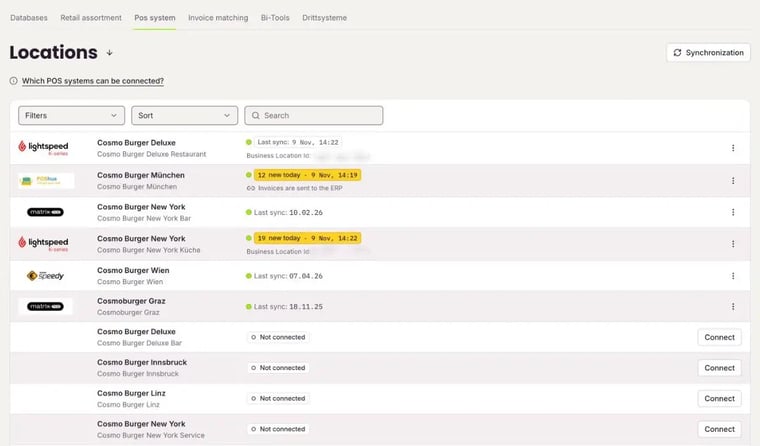
To see which POS systems you can connect, click Which POS systems can be connected? on the page. If you have questions about the connection, our support will help.
Invoice matching
Matching delivered goods with invoices takes a lot of time: substitute items, different quantities, breakage. With our partner Billbox this happens automatically. The Invoice matching tab shows your Billbox connections.
Bi-Tools and third-party systems
Here you connect FoodNotify with other programs, for example Eaternity. Eaternity calculates the carbon footprint of your recipes and ingredients. Our support activates these integrations for you.
Want to connect your own program or script to FoodNotify? Create an API token in your profile. More: Profile & personal settings