![Nav Support Center.svg]](https://help.foodnotify.com/hubfs/Support%20Center/Design/Nav%20Support%20Center.svg)
Allergens, additives, nutritional values, prices and weights of your ingredients come from your suppliers' product data. FoodNotify takes them directly into your recipes.
In the recipe
Open a recipe: for each ingredient you see supplier, price and allergens. In the sidebar, FoodNotify summarises the allergens, additives, average nutritional values and weight of the whole recipe.
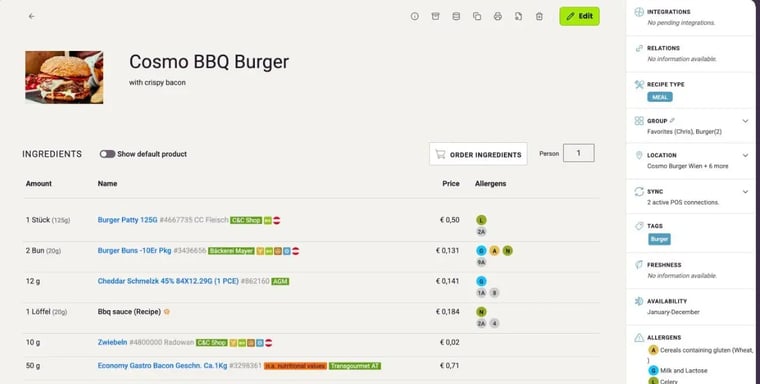
If an ingredient has no nutritional values, it is marked n.a. nutritional values. If important delivery information such as price or weight is missing, the ingredient is marked in red. In both cases, it's best to ask your supplier: Why are product data, prices or other details not displayed correctly?
In the ingredients overview
Under Recipes › Ingredients, you see all the ingredients of your recipes with supplier, item number and price: How do I manage my ingredients?
Check manufacturer information
Manufacturers change their recipes from time to time. So compare the information in FoodNotify with the packaging regularly – especially for allergens.