![Nav Support Center.svg]](https://help.foodnotify.com/hubfs/Support%20Center/Design/Nav%20Support%20Center.svg)
The recipe database contains ready-made recipes that you can take into your own recipes and adapt. Open Recipes › Recipes database.
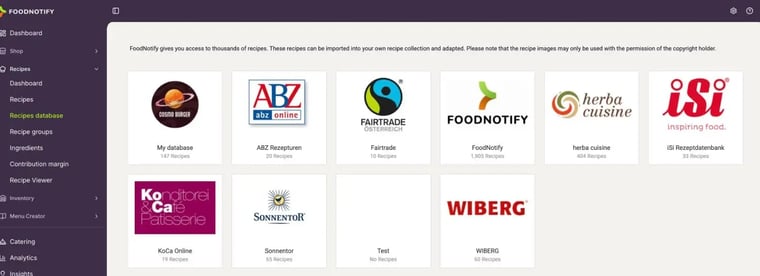
What's inside?
- My database: your own recipe database. Only you and your users can see it – ideal if you maintain standard recipes for several locations.
- FoodNotify: almost 2,000 recipes that you can use freely.
- Databases from partners such as herba cuisine, iSi, Sonnentor or WIBERG – as extra inspiration.
Please note: you may only reuse recipe photos from the database with the consent of their authors.
Search and view recipes
Click a database to see its recipes. Search by name at the top and filter by recipe type, tags and groups on the right. Click a tile to open the recipe with ingredients, allergens and preparation.
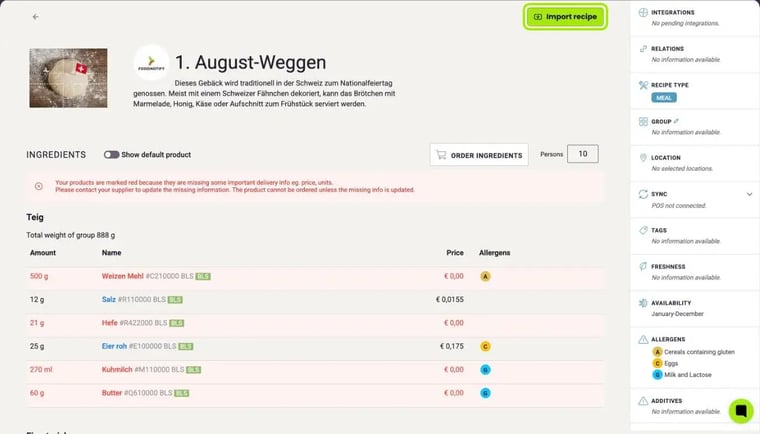
Ingredients marked in red don't have a price or weight yet. After importing, it's best to replace them with products from your own suppliers: How do I replace ingredients in my recipes?
Take a recipe into your recipes
In the recipe, click Import recipe. If you have several locations, you choose in the next step which locations get the recipe. You then find it under Recipes › Recipes and edit it like any recipe of your own. All the details: How do I import recipes from the recipe database into my locations?
Add your own recipes to the database
It also works the other way round: with the database icon at the top of one of your recipes, or with Action › Import to recipe database in the recipe overview, you add recipes to your own database.