![Nav Support Center.svg]](https://help.foodnotify.com/hubfs/Support%20Center/Design/Nav%20Support%20Center.svg)
If you change supplier or a product is no longer available, you replace the ingredient in all affected recipes in one step.
Via the ingredients overview
- Open Recipes › Ingredients.
- Find the ingredient and click the number in the Recipes column, for example 4 recipes. The Replace ingredient page opens.
- Under Replace with, enter the new ingredient. You can search for products, recipes or ingredient groups.
- In the list, choose the recipes in which it should be replaced – all or just some. The filter shows you, for example, only recipes that are in use at a location.
- Click Replace in … recipes.
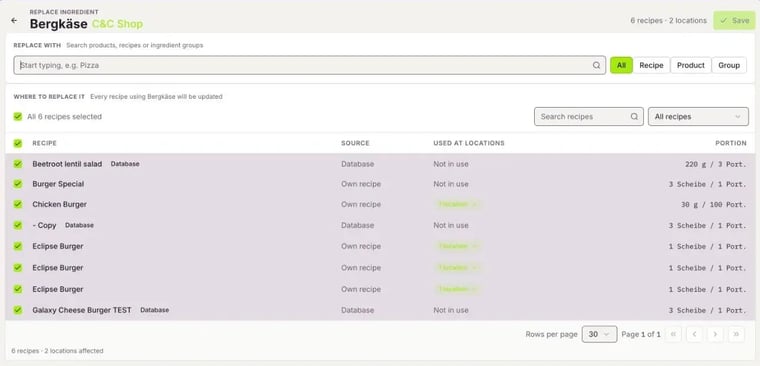
In the Source column, you see whether a recipe comes from the Database or is your Own recipe. Next to it, you see the locations where the recipe is used.
Directly in the recipe
In a recipe's edit mode, you find the Replace option under ⋮ for each ingredient.

Tip: This is also how you improve the carbon footprint of your recipes: replace ingredients with a high carbon footprint with more climate-friendly alternatives. You see the rating in the recipe sidebar under Environmental evaluation.
Everything about the ingredients overview: How do I manage my ingredients?