![Nav Support Center.svg]](https://help.foodnotify.com/hubfs/Support%20Center/Design/Nav%20Support%20Center.svg)
Before you reorder: First import all orders that have already been delivered. Otherwise your stock is wrong and you order twice.
How to reorder
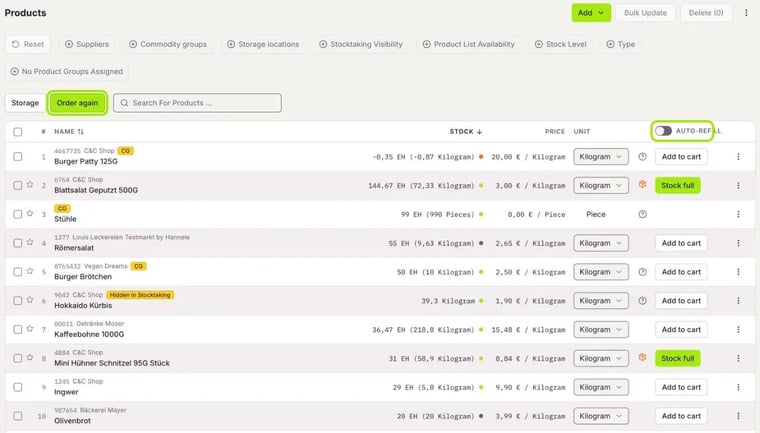
- Open Inventory › Products and click the Order again tab.
- Check the Stock and choose another Unit if needed.
- Switch on Auto-Refill, and FoodNotify fills up the quantities to the target stock.
- For a product, click Add to cart. The product goes into its supplier's cart.
- Then send the order from the cart: How do I order with FoodNotify?
What do the symbols mean?
- ?: No target stock is set for the product yet. Click the question mark or the product name and enter the values: Set stock limits
- Stock full: The target stock has been reached. You don't need to order anything.
Reorder from an order
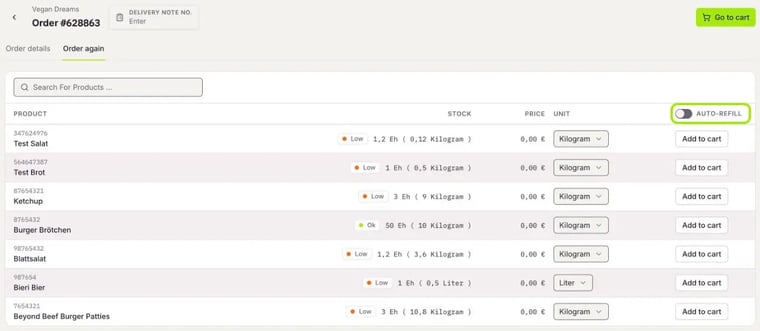
You can also reorder directly from an imported order:
- Open Inventory › Orders and click an order.
- Switch to the Order again tab.
- For the products, click Add to cart. Then open the cart with Go to cart.