![Nav Support Center.svg]](https://help.foodnotify.com/hubfs/Support%20Center/Design/Nav%20Support%20Center.svg)
You print recipes directly from the recipe overview or from the open recipe – in your recipes just like in the recipe database.
Set the print settings
- In the recipe overview, click Print settings at the top right.
- Tick what should be printed: for example photo and photo size, description, preparation with step images, ingredients with subrecipes and price, sales and contribution margin, and information from the sidebar such as allergens, additives, nutritional values and weight.
- Click Save.
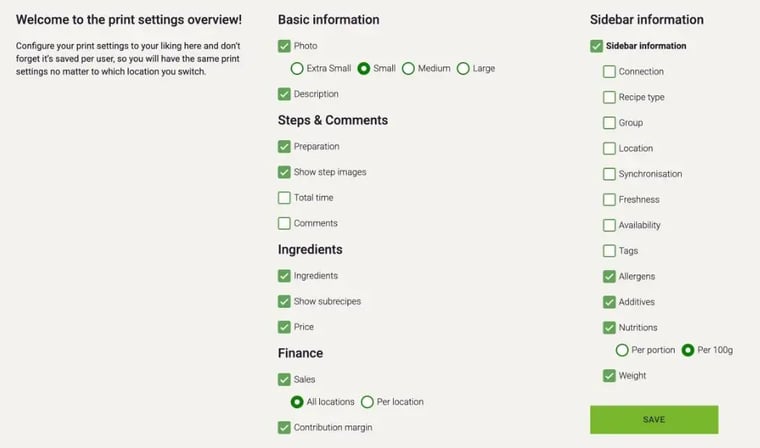
The print settings are saved per user. They stay the same when you switch between your locations.
Print a recipe
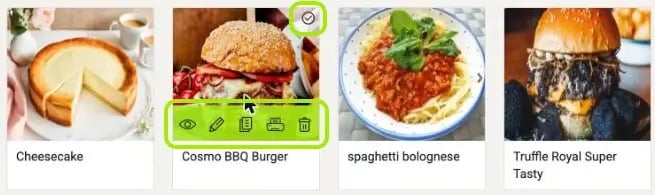
In the recipe overview, hover over the tile and click the printer icon. Or open the recipe and click the printer icon at the top.
Create a cookbook
- In the recipe overview, hover over the recipes you want and click the tick at the top right of each tile.
- At the bottom, choose Create cookbook under Action.
- Select all adds all recipes in the overview. With Arrange selection, you drag and drop the recipes into the order you want.
- Choose the language of the cookbook and click OK.
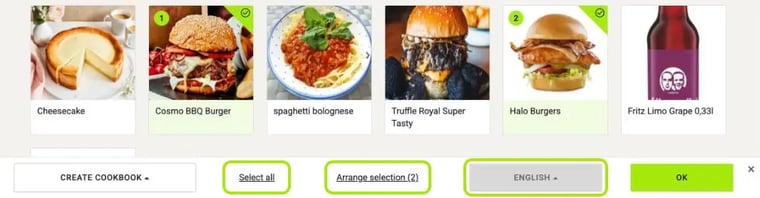
With Arrange selection, you put the recipes in the right order by drag and drop:

Buffet cards
With Action › Create catering-cards, you turn the selected recipes into cards for your buffet.
Tip: You can also create compact recipe cards for the kitchen with the mini recipe card in the Recipe Viewer: What is the Recipe Viewer?