![Nav Support Center.svg]](https://help.foodnotify.com/hubfs/Support%20Center/Design/Nav%20Support%20Center.svg)
Weight is lost when cleaning, peeling, frying or cooking. For your calculation to be right, you include this loss in your recipes. With loss templates, you define the usual values once.
Create a template
- Click the gear icon at the top right and open Settings › Recipes › Loss templates.
- Click Add.
- Enter a Name, for example Vegetable trimming loss, and the Loss in %, for example 15.
- Click Save.
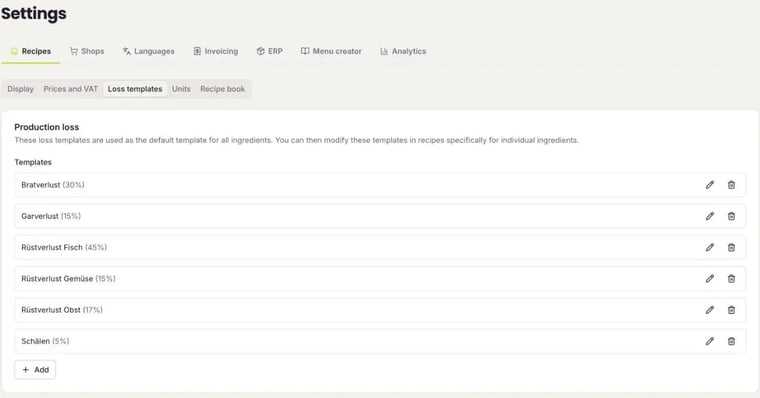
Use the pencil to edit a template. FoodNotify then asks whether the change should also apply to ingredients for which the template was changed in the recipe. If you delete a template, it is also removed from the ingredients, as long as it wasn't changed there.
Use a template in a recipe
- Open the recipe in edit mode.
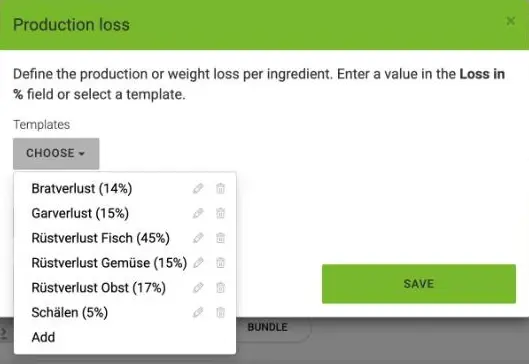
- Click % next to the ingredient's loss.
- Under Templates, choose the matching template with Choose – or enter your own value under Loss in %.
- Click Save and then save the recipe.
How gross, loss and net are connected: How do I create a recipe?