![Nav Support Center.svg]](https://help.foodnotify.com/hubfs/Support%20Center/Design/Nav%20Support%20Center.svg)
If you don't need a recipe right now, for example a seasonal dish, archive it instead of deleting it. It disappears from the overview and can be restored at any time.
To archive recipes, you need the permission Archive/Activate: How do I create roles for users?
Archive a single recipe
- Open the recipe.
- Click the Archive icon at the top – the second icon from the left.

To restore the recipe, open the archived recipe and click the icon again.
Several recipes at once
- In the recipe overview, select the recipes with the tick on each tile.
- At the bottom, choose Archive recipe under Action and click OK.
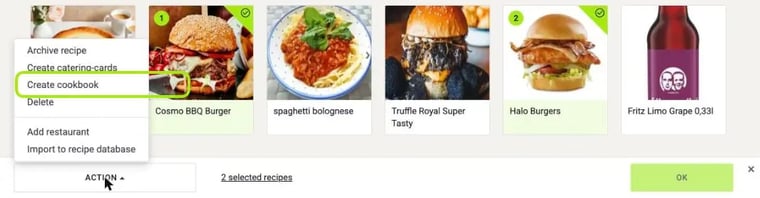
To restore them, select the archived recipes and choose Activate recipe under Action.
Find archived recipes
In the recipe overview, tick Archived recipes under Filter on the right. You then see all archived recipes at a glance.
And if I really want to delete a recipe?
Deleted recipes cannot be restored. Here's how to go about it: How do I delete recipes?