![Nav Support Center.svg]](https://help.foodnotify.com/hubfs/Support%20Center/Design/Nav%20Support%20Center.svg)
Before you delete: if you only want to take a recipe out of the overview, it's better to archive it. You can bring archived recipes back at any time: How do I archive or restore a recipe?
Delete many recipes at once
Deleted recipes can't be restored. That's why FoodNotify support deletes them for you:
- Click the gear icon at the top right and open Settings › Recipes › Recipe book.
- Under Recipes to delete, choose what should be deleted: all recipes, only recipes from the recipe database or only recipes that don't come from the recipe database.
- If needed, write a Note for support.
- Click Request deletion and confirm with Send request.
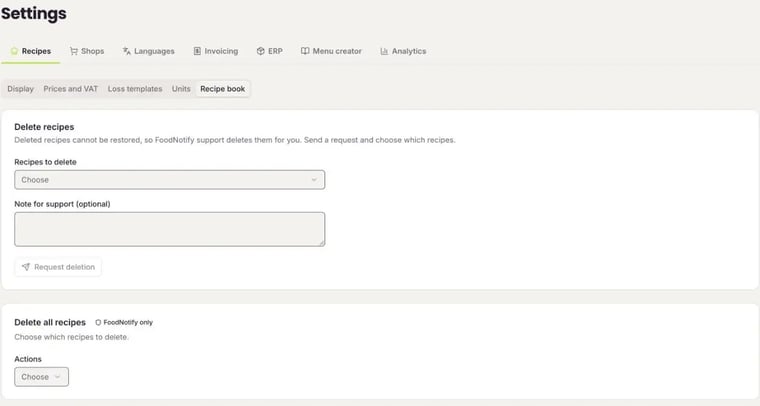
Recipes are only deleted once support has processed your request. Until then, the settings show when the request was sent.
Delete single recipes
You delete a single recipe with the bin icon – on the tile in the recipe overview or at the top of the open recipe. For this you need the permission Delete: How do I create roles for users?