![Nav Support Center.svg]](https://help.foodnotify.com/hubfs/Support%20Center/Design/Nav%20Support%20Center.svg)
The Support Center is available in German, English and French. For all other languages – for example Turkish, Polish, Croatian or Arabic – the Translate button translates the page for you.
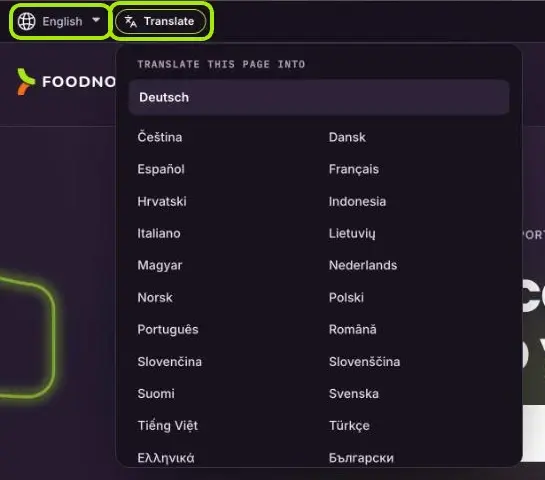
German, English or French
- Click the current language at the top left, for example English.
- Choose Deutsch or Français.
If you are reading an article, the same article opens in the other language, as soon as it exists there.
Any other language: the Translate button
- At the top left, next to the language, click Translate.
- Under Translate this page into, choose your language. The language set in your browser is shown at the top.
- The page is translated. The button now shows your language, and a note at the top of the page says that it was machine translated.
Your language stays selected: the next pages you open are translated too. To go back to the original, use the button in the note at the top of the page, or Show original in the button's menu.
Search works in your language as well: just type your question in Turkish or Polish – FoodNotify still finds the right articles. The same applies to voice search.
What you need
- The Translate button is available on computers. It uses your browser's built-in translation – this works best in an up-to-date version of Google Chrome.
- The translation runs directly on your device; nothing is sent to other services. The first time, your browser briefly downloads the language pack.
- If your browser doesn't support built-in translation, the button shows you how to translate the page with your browser's own translation feature: in Safari via View › Translation, in Firefox via the translate icon in the address bar.
- On phones and tablets, translate the page with your browser's translation feature.
Machine translations aren't always perfect. Menu items and buttons in FoodNotify may be named differently than in the translation. If in doubt, use Show original.