![Nav Support Center.svg]](https://help.foodnotify.com/hubfs/Support%20Center/Design/Nav%20Support%20Center.svg)
Hardly anyone in a kitchen thinks in grams: a ladle of sauce, a spoon of mustard, a piece of butter. With units, you define once how much that is – and FoodNotify uses it to calculate costs and nutritional values precisely.
Global units
Global units apply to all ingredients.
- Click the gear icon at the top right and open Settings › Recipes › Units.
- Click Add.
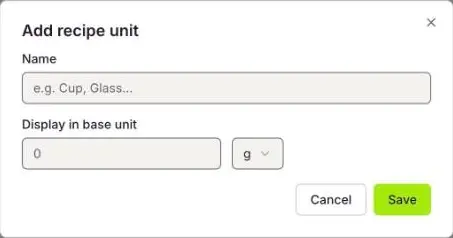
- Enter the Name, for example Cup, and enter under Display in base unit how much one unit is, for example 200 ml.
- Click Save.
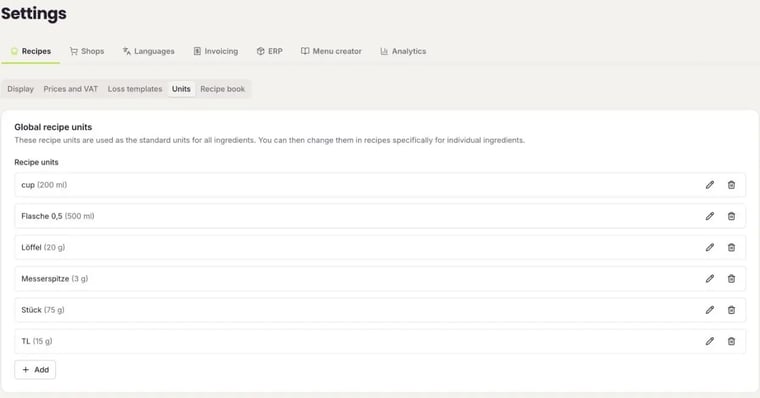
Use the pencil to edit a unit and the bin to delete it. A deleted unit is also removed from the ingredients, as long as you haven't changed it there.
Custom units of an ingredient
Custom units apply to one specific ingredient only – for example Patty (150 g) for your burger patty, or a scoop of flour that you weigh once. This is how you standardise your recipes. You set custom units in the recipe, in the ingredient's unit menu under Own units.
Choose a unit in the recipe
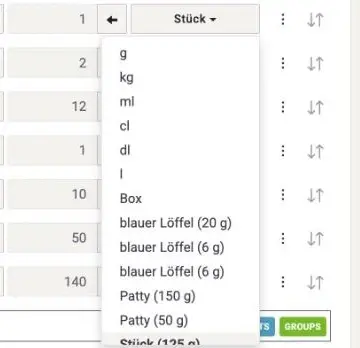
In the recipe, click the unit next to the quantity. At the top you see the standard units and the ingredient's own units, below them your Global recipe units.
You can also create losses such as trimming or frying loss centrally as templates: How do I create loss templates?