![Nav Support Center.svg]](https://help.foodnotify.com/hubfs/Support%20Center/Design/Nav%20Support%20Center.svg)
Your invoices
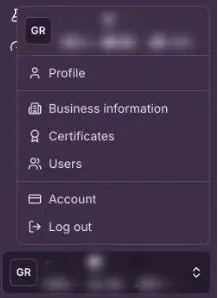
Click your name at the bottom of the sidebar, then Account. There you find your FoodNotify invoices. Only the main user of your account has access to this area.
We send invoices by email to the main user. If your accounting department should receive them too, add their address under the gear icon › Settings › Invoicing. More: General settings
Invoice details and VAT number
For your invoices we use the details under Business information: company name, address and VAT number. More: How do I set up my company, locations and cost centers?
Payment methods
You pay for FoodNotify by SEPA direct debit or credit card.
Changing payment details
If you want to change your payment details, contact our support.
Cancellation
You find the notice period in your offer. Cancellations must be made in writing. The easiest way is for the main user to use our cancellation form.
Questions about your subscription? Contact our support.