![Nav Support Center.svg]](https://help.foodnotify.com/hubfs/Support%20Center/Design/Nav%20Support%20Center.svg)
If you cook a recipe for a certain number of portions, you order the ingredients directly from the recipe. Requirement: your suppliers are connected to FoodNotify – their product ranges are the ingredients of your recipes.
How it works
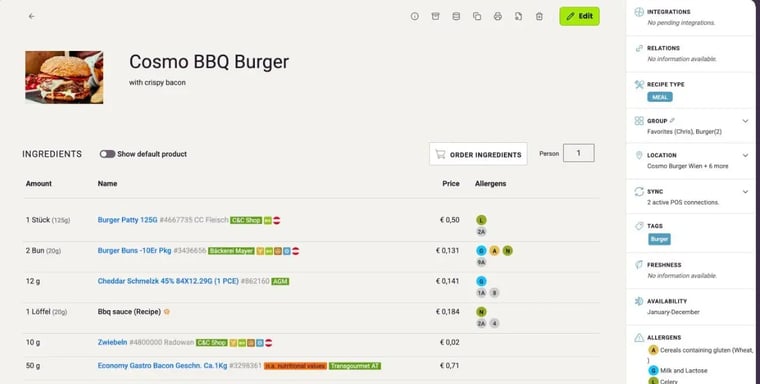
- Open the recipe.
- Under Person, enter how many portions you are cooking.
- Click Order ingredients.
- FoodNotify assigns each ingredient to its supplier. You see the price, the quantity the recipe needs in the Recipe column and how many packaging units you need.
- Set the Quantity for the cart and click Add to cart.
- Send the order from the cart as usual.
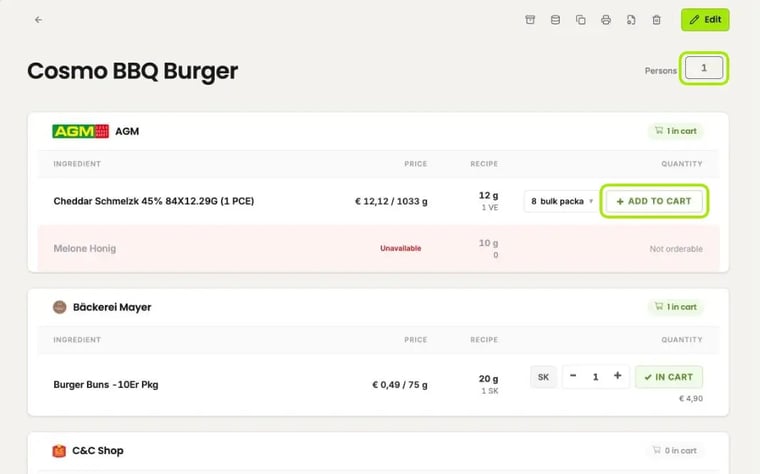
If a product is already in one of your carts, it says In cart – you can still change the quantity. Ingredients that the supplier can't deliver are shown as Unavailable.
Example
You're cooking potato soup for 50 portions and need 6,250 g of potatoes for it. Your supplier delivers potatoes in 4 kg cans. To make sure you have enough, you put 2 cans in the cart.
More about ordering: Carts: What do Active, Draft and Faulty mean?