![Nav Support Center.svg]](https://help.foodnotify.com/hubfs/Support%20Center/Design/Nav%20Support%20Center.svg)
FoodNotify creates a separate cart for each supplier and location. You find all carts in the sidebar under Shop › Carts.
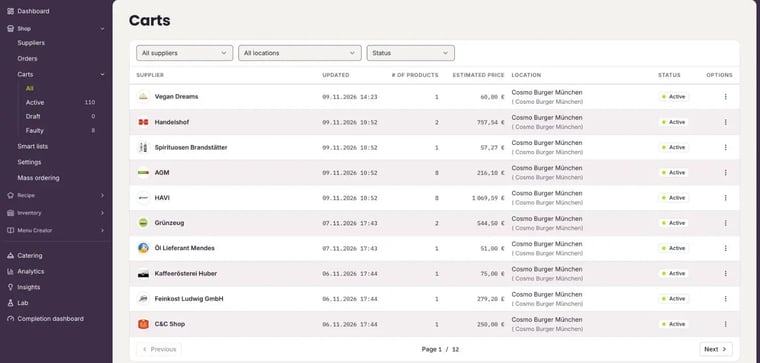
- Active: This is where you collect what you want to order next.
- Draft: Items that could not be delivered on the selected delivery date. You order them later.
- Faulty: Items that lack information, for example a price or a weight. You can only order them once your supplier has provided the data.
For each cart, the overview shows the supplier, the last update, the number of products, the estimated price, the location and the status. Filter by supplier, location or status at the top. Use the three dots to open a cart with Go to cart or to delete it with Delete cart.
In the active cart
In the active cart you see at a glance which items can be ordered for your delivery date:
- Items without colour are ordered straight away with Send order.
- Items highlighted in orange cannot be delivered on the selected date. Choose another day on the right under Delivery date. If you send the order anyway, they are moved to the Draft cart.
- Items highlighted in red cannot be ordered and are moved to the Faulty cart when you send the order.
Order postponed items later
- Under Shop › Carts, open Draft or Faulty.
- Open the supplier's cart.
- In the draft, choose a delivery date on which the items can be delivered and send the order. For faulty items, ask your supplier for the missing data. As soon as they are there, you can order.
How an order works step by step: How do I order with FoodNotify?