![Nav Support Center.svg]](https://help.foodnotify.com/hubfs/Support%20Center/Design/Nav%20Support%20Center.svg)
Since 9 November 2026, FoodNotify has a new look and a new navigation. All areas are still there, only their place has changed. Here is where to find what.
Prefer watching to reading? Everything new in 90 seconds on video.
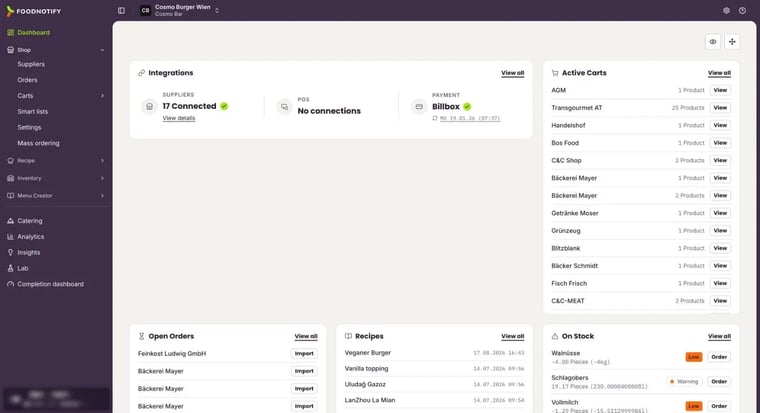
The sidebar
On the left you find all areas of FoodNotify, the same on every page. Expand entries with an arrow to see their pages.
- Dashboard: your start page with an overview of your location.
- Shop: suppliers, orders, carts, smart lists and the settings for purchasing.
- Recipe: your recipes and ingredients, recipe groups and the contribution margin.
- Inventory: the dashboard and products, plus the groups Stock movements (Orders, Food waste, Stock transfer, Sales, Stocktaking), Configuration (Storage, Commodity groups) and Global (Settings).
- Menu Creator: menus, weekly menus and buffet cards.
- Depending on your plan, also Catering, Analytics and Insights.
Entries marked Locked are not enabled for you. The icon at the top left shows or hides the sidebar.
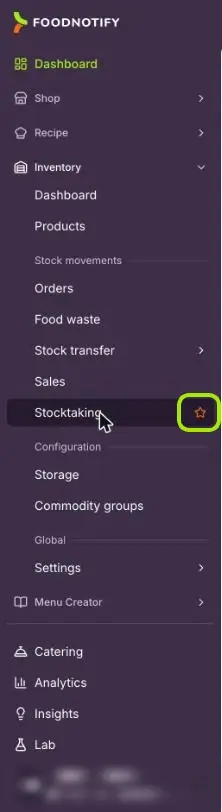
Favorites
Star the pages you use most: hover over an entry in the sidebar and click the star. The page then appears in the sidebar under Favorites. Click the star again to remove it.
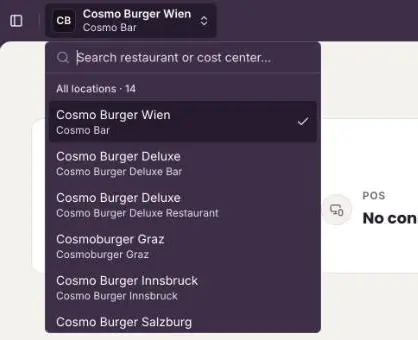
Switching location or cost center
At the top you see the location you are working in. Click its name to switch. The search field finds locations and cost centers by name, and the ones you used last are listed under Recent.
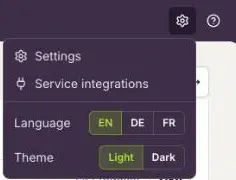
Settings, language and theme
Click the cog at the top right. There you find:
- Settings
- Service integrations to connect FoodNotify with other systems
- Language: English (EN), German (DE) or French (FR)
- Theme: Light or Dark
Profile, business information and users
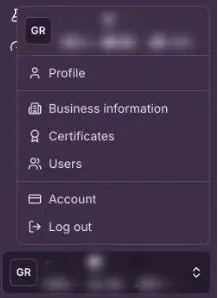
Your name and email address are at the bottom of the sidebar. Click them to open your menu. Depending on your permissions, it contains Profile, Business information, Certificates, Users and Account. Log out signs you out.
Help
The question mark at the top right takes you straight to the Support Center. If you don't find an answer there, reach us via Contact Support.